> ## Documentation Index
> Fetch the complete documentation index at: https://docs.chatfly.co/llms.txt
> Use this file to discover all available pages before exploring further.
# Streaming Response
> In this guide, we will walk through the process of obtaining a streaming response from the ChatFly API.
### API Endpoint
The API endpoint for obtaining a streaming response is:
```text theme={null}
https://backend.chatfly.co/api/chat/get-streaming-response
```
### Request Body
To get a streaming response, you need to send a POST request to the API endpoint with a JSON request. Here's an example JSON request:
```json theme={null}
{
"bot_id": "xxxx-xxxx-xxxx-xxxx",
"message": "string",
"session_id": "xxxx-xxxx-xxxx-xxxx"
}
```
* bot\_id (string): ID of your bot.
* message (string): Message from the user.
* session\_id (string): ID of the session.
### Example Request
Here are example commands to obtain a streaming response using the ChatFly API:
```json curl theme={null}
curl -N -X POST "https://backend.chatfly.co/api/chat/get-streaming-response" \
-H 'accept: application/json' \
-H 'Content-Type: application/json' \
-d '{
"bot_id": "xxxx-xxxx-xxxx-xxxx",
"message": "string",
"session_id": "xxxx-xxxx-xxxx-xxxx"
}'
```
```json python theme={null}
import requests
url = "https://backend.chatfly.co/api/chat/get-streaming-response"
headers = {
'Content-Type': 'application/json',
}
data = {
"bot_id": "xxxx-xxxx-xxxx-xxxx",
"message": "string",
"session_id": "xxxx-xxxx-xxxx-xxxx",
}
response = requests.post(url, headers=headers, json=data, stream=True)
if response.status_code == 200:
print("Request successful!")
# Process the streaming response as needed
for chunk in response.iter_content(chunk_size=1024):
if chunk:
# Process each chunk of the streaming response
print(chunk.decode('utf-8'), end="", flush=True)
else:
print("Request failed with status code:", response.status_code)
print(response.text)
```
```json fetch/javascript theme={null}
const url = "https://backend.chatfly.co/api/chat/get-streaming-response";
const headers = {
"Content-Type": "application/json"
};
const data = {
bot_id: "xxxx-xxxx-xxxx-xxxx",
message: "string",
session_id: "xxxx-xxxx-xxxx-xxxx",
user_id: "xxxx-xxxx-xxxx-xxxx",
sender: "xxxx-xxxx-xxxx-xxxx"
};
const decoder = new TextDecoder('utf-8');
fetch(url, {
method: 'POST',
headers: headers,
body: JSON.stringify(data),
})
.then(response => {
// Check for error response
if (!response.ok) {
return response.text().then(errorText => {
throw new Error(`Request failed with status code:: ${response.status} - ${errorText}`);
});
}
console.log("Request successful!");
// Otherwise, return the streaming response body
return response.body;
})
.then(stream => {
// Create a reader to read the stream
const reader = stream.getReader();
// Define the function that will handle the stream
function read() {
reader.read().then(({ done, value }) => {
// Check to see if we're done with the stream
if (done) {
return;
}
// Convert the value (a Uint8Array) to a string
const text = decoder.decode(value);
process.stdout.write(text);
// Read some more, and call this function again
read();
});
}
// Start reading the stream
read();
})
.catch(error => {
console.error(`An error occurred: ${error}`);
});
```
### Response Body
The streaming response is as follows:
```
string
```
* string (string): A string of the response.
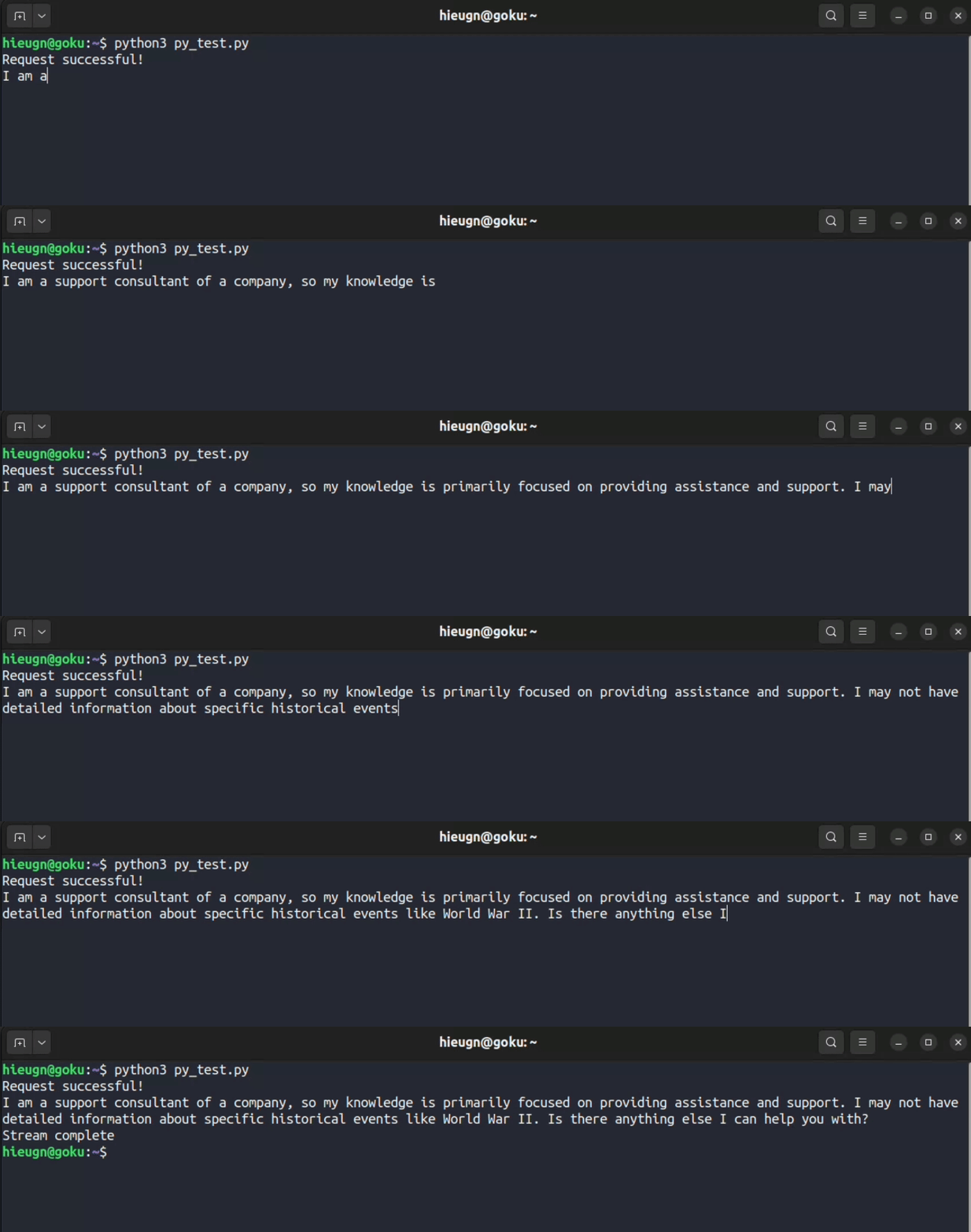
Result with python, equivalent to javascript and curl: